 SimpleACME
Certificates with ArtFiles.
Keep your DNS API private.
Use ArtFiles for your DNS zone and SimpleACME for delegated DNS-01 challenge updates. One permanent CNAME can replace recurring DNS edits and the need to expose an HTTP challenge listener just for certificates.
Prepare your ArtFiles domain →Requires a DNS plan that permits your exact challenge CNAME. No affiliation or universal compatibility is claimed.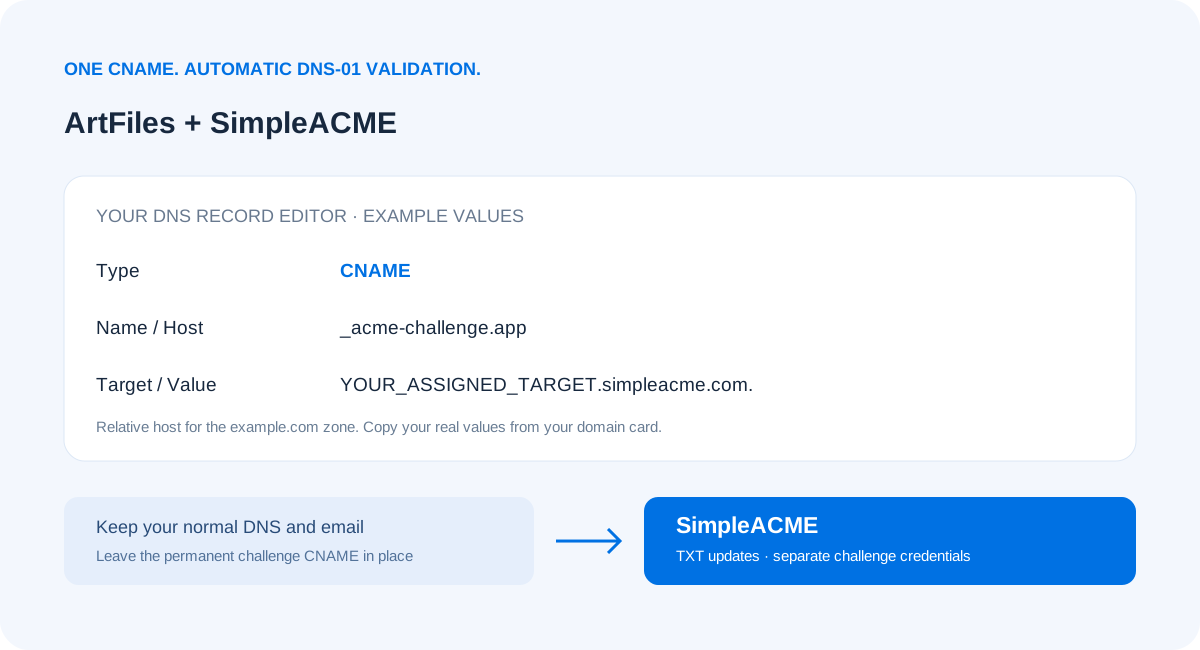
Choose a smaller credential footprint
A certificate renewal task needs to prove domain control. It usually does not need broad control over your ArtFiles website, mail or other zone records. SimpleACME lets the client update its assigned challenge target using separate credentials, while you retain normal DNS administration at ArtFiles. Those challenge credentials are still sensitive: protect them, use restricted files and keep your permanent delegation under your control.
How to add the CNAME at ArtFiles
Use this record-field checklist with the ArtFiles reference. Control names vary by account and product; this is not a claim of a verified dashboard layout.
- Sign in to ArtFiles and open DNS records for the authoritative zone that contains your hostname. If another host runs the nameservers, edit the record there instead.
- Choose Add record (the control may be called Create or New) and select CNAME. Do not choose A, TXT, URL forwarding or an HTTP redirect.
- Copy the challenge owner from your SimpleACME domain. In the example.com zone, app.example.com uses _acme-challenge.app as a relative host; the apex or wildcard uses _acme-challenge. Use the full owner only if the editor requests it.
- Paste the assigned SimpleACME CNAME destination into Target, Value, Points to or Alias. Use the real destination from your account, without https:// or a URL path. Preserve the final dot if the editor supports it.
- Choose the default or a short TTL permitted by ArtFiles. If the provider offers HTTP proxying for this record, select DNS-only so the CNAME remains publicly resolvable. Save the record.
- Check for existing TXT or CNAME records at that exact owner. A CNAME must not coexist with other data there. Resolve conflicts deliberately without deleting your website, mail or unrelated verification records.
- Open the SimpleACME domain and choose Check CNAME. Once it matches, keep the record for later renewals. Activate paid access and configure your ACME client; a demo cannot publish TXT updates.
Example record shape
_acme-challenge.app.example.com. CNAME YOUR_ASSIGNED_TARGET.simpleacme.com.The target above is a placeholder. Copy your real assigned target; do not create a DNS API token at ArtFiles for this delegated workflow.
Native ArtFiles automation: what you avoid supplying
The linked native integration documentation references the following configuration identifiers. These belong to the native provider integration; they are not inputs to SimpleACME. A native integration can be appropriate when its permissions and operational model suit you.
ARTFILES_PASSWORDARTFILES_USERNAME
With SimpleACME, choose your client’s ACME-DNS integration or documented hook instead. Keep provider credentials out of that client.
Compare certificate validation options
| Requirement | SimpleACME | HTTP-01 | Native ArtFiles DNS-01 |
|---|---|---|---|
| Public HTTP challenge path | Not required | Port 80 must be reachable | Not required |
| DNS-provider credentials in renewal workflow | No ArtFiles API credential; separate challenge credentials | Not required | Usually a provider-specific credential or authenticated integration |
| Wildcard validation | DNS-01 wildcard workflow | Not supported | Supported by suitable DNS-01 clients |
| Initial DNS work | Set the challenge CNAME once | Route hostname to challenge responder | Configure API permissions and client integration |
| Ongoing integration | Reuse one delegated update workflow | Maintain listener, routing and renewal client | Maintain provider integration and credentials |
| Cost and dependency | Yearly subscription and SimpleACME availability | Can be free with your client/CA | Provider/client dependent |
Our choice for private services and mixed environments
SimpleACME is the strongest fit when your goal is to avoid opening HTTP solely for validation, keep ArtFiles API credentials off renewal hosts, and reuse one DNS workflow across different applications. You still configure a renewal client, protect its challenge credentials, and deploy the issued certificate. HTTP-01 remains convenient for an already-public website, and a narrowly scoped native DNS API can also be a good fit.
Client guides and working examples
Traefik · win-acme · Certbot · Certbot Docker · AI setup prompt. Complete configuration downloads and scripts are available with active paid access.
ArtFiles references and compatibility checks
ArtFiles official website ↗ · Provider / native integration reference ↗. Research date: 2026-11-08. The reference was retrieved during directory research. Native API documentation does not establish CNAME permissions for every account. Review your plan, DNS ownership, proxy behavior and CAA restrictions before deployment.
Let’s Encrypt’s challenge documentation explains port-80 validation, wildcard support and challenge delegation.
ArtFiles certificate setup FAQ
Can I keep ArtFiles for DNS?
Yes, when your DNS plan allows the required challenge CNAME. Keep your authoritative DNS, website and email where they are. SimpleACME handles the delegated challenge target, rather than moving your zone.
Do I need a ArtFiles API key?
SimpleACME renewal clients use their assigned SimpleACME credentials, not your normal DNS-provider API credentials. You still need authorized access to add the initial CNAME at the authoritative DNS host. Native provider API automation remains a separate alternative.
Where do I add the CNAME with ArtFiles?
First confirm which nameservers are authoritative. If ArtFiles hosts the active zone, open its DNS record editor and use the exact owner and destination from the SimpleACME domain card. A registrar account alone does not prove that DNS is hosted there. Consult the provider reference below for current controls.
Can my service stay private?
DNS-01 validates public DNS, so your application does not need a public HTTP-01 listener. Your ACME client still needs outbound access to the certificate authority and SimpleACME, and the challenge DNS must resolve publicly.
Can I get a wildcard certificate with ArtFiles DNS?
A compatible delegated DNS-01 workflow supports wildcard validation. A name such as *.example.com matches first-level subdomains; the wildcard itself does not cover example.com or deeper names. Choose the appropriate paid coverage and certificate identifiers.
Is HTTP-01 unsafe?
HTTP-01 is a standard, valid method for publicly reachable services. SimpleACME is especially useful when you would otherwise expose a private service or maintain port-80 challenge routing solely for renewals. It reduces that requirement; it does not make all HTTP-01 deployments insecure.
Which client should I configure?
Use the SimpleACME ACME-DNS workflow in Traefik, win-acme PowerShell hooks, or Certbot Bash hooks, including Docker. Client compatibility and certificate installation remain separate checks. Do not select a native ArtFiles API plugin when your intention is to use delegated SimpleACME updates.
What if ArtFiles blocks my challenge CNAME?
Do not buy on the assumption that every hosted or dynamic DNS product permits this record. Confirm the exact owner name, plan permissions and any existing conflicting TXT/CNAME data first. A provider-supported delegation or different authorized DNS arrangement may be needed.
Can I try the DNS setup before paying?
A free account can prepare one single-domain demo and its CNAME. Demo updates are blocked. Paid single-domain and wildcard registrations activate only after verified payment. Subscriber guides and scripts require active access.
Your next certificate. A little less complicated.
Keep your DNS provider and your ACME client.
Prepare your domain before activating paid updates.